This article contains the steps for moving a Statistica installation (CNET version) to a new server.
Requirements
Windows operating systems only. Only for Statistica 13.0 and higher, Windows Server 2008 R2 (Windows 7) and higher.
What might be the reasons for moving the Statistica software (CNET) to a new server?
- the old server operating system is no longer supported
- upgrading to a new server
- replacing an old server
Note: Only for CNET-type installations, i.e., any network installation with a serial number that contains the character combination CNET, or ARCN, in its second part.
Scenario 1
The application files and the licensing service are located on the same server.
- Install all Statistica components (application files, licensing services, and workstation installer files) on the new server
- Change the license file location information for each workstation / client so that it matches the new server information (see How to point to a different license server?)
- The move is complete
Scenario 2
The application files and the licensing service are located on a different server
If you are only upgrading the server on which the licensing service is located, proceed as follows:
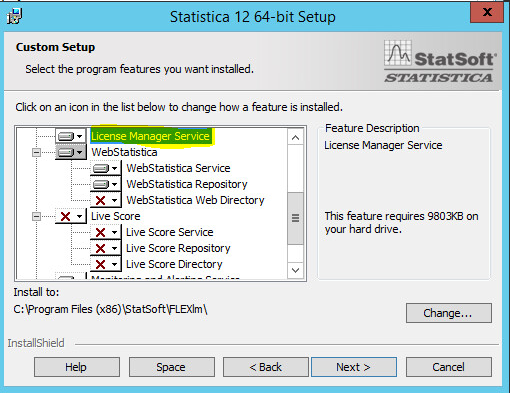
- After starting the new installation, select the Custom (Uživatelská) installation option and simply select License Manager Service (Služba Správce licencí):
2.Once the new licensing service completes installation, use the ClientSTAT.tmp file as the new file for the workstation (clients), which is usually located in C:Program Files(x86) StatisticaFLEXlm. (see: How to point to a different license server?)