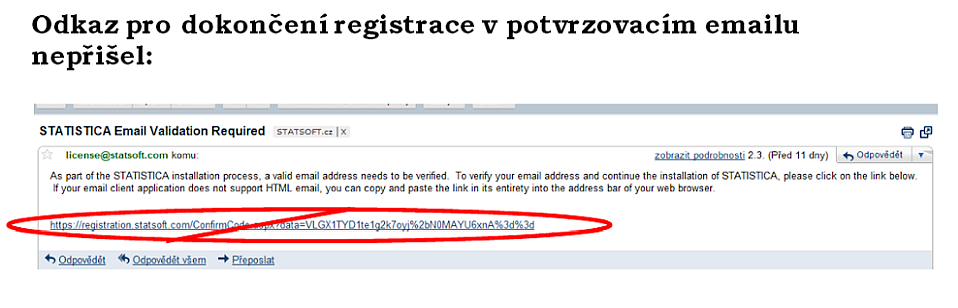
Try to rule out the following possibilities:
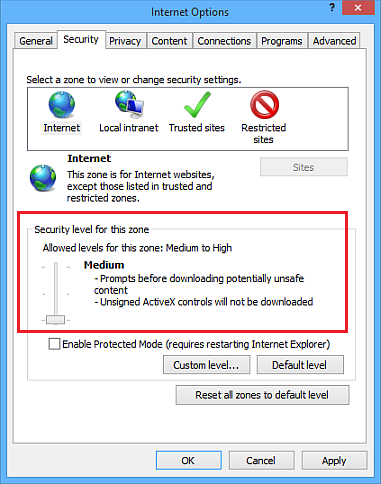
Check the security settings of your internet browser to see whether it is not blocking unsafe parts of the website content. In the MS Internet Explorer browser (see the attachment below), in the Tools menu select Internet Options and a dialog box will appear; choose the Security tab and on it the required zone: Internet, and clear the Enable Protected Mode option. Confirm with OK and close the browser. Then try the installation again.
If you forward your school email to a private email and operation no. 1 does not help, try to load the link directly from the school's web mail application.
The email contains a link, but it is inactive.
If the link is present in your school mailbox but is not active when clicked, copy this link and paste it in full into the address bar of your web browser.
The confirmation email did not arrive at all.
- If during registration you entered your e-mail with the school domain and the confirmation e-mail (from license@statsoft.com) did not arrive at all and is not in the spam folder either, then, in case you received a dialog with error code: 0 during the registration attempt, the problem is probably caused by an outage of the registration server at our headquarters. Send us an email to support@datafriends.cz and we will take steps to fix it.
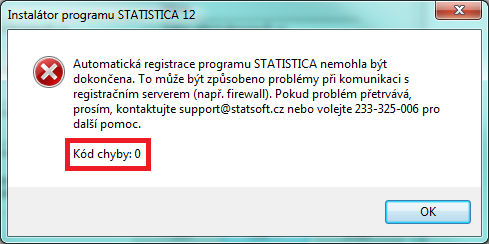
- If you did not receive a dialog with error code 0, contact the provider of your university emails; the local mail server may, for example, be out of service, temporarily overloaded, etc.