This article covers the emergency extension of a Statistica program license. The emergency extension of the Statistica software serves the purpose of temporarily extending the product when the license expiration date is approaching or the license has already expired. It can be used in situations where you need to resolve a problem with an existing license, cover the period until a new license is ordered, and so on.
The following applies to the emergency license extension for the network version:
- the validity will be extended by 28 days
- it can be used only once during the license validity period
- available from Statistica 12
- requires an internet connection
We perform the extension using the Správce plovoucích licencí. It is available on the server part of the Statistica installation. In the menu Start / Všechny programy / Statistica/ Správce plovoucích licencí, click the Obnovení licence: button
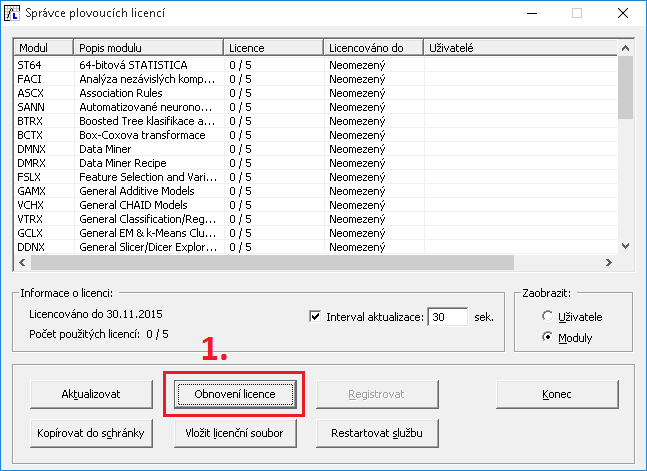
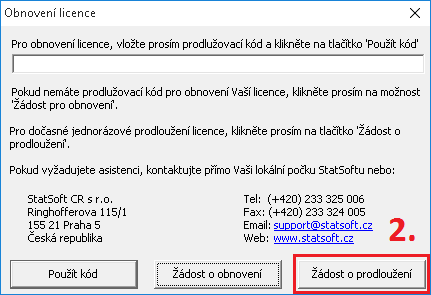
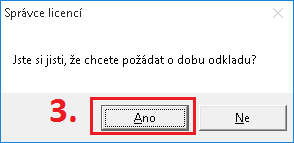
Alternative option – web form:
If one of these situations occurs:
- Limited or no internet connection on the computer where Statistica (or the Správce plovoucích licencí) is installed.
- The Správce plovoucích licencí is not installed (network versions).
- An error occurred when using the Žádost o prodloužení option.
- You are using a version older than Statistica 12.
Then the request can be processed via the website (from any computer). You need to enter an email address and then attach the license file STAT.lic.
The license file is usually located at:
C:Program Files (x86)StatSoftFLEXlmstat.lic
C:Program Files (x86)DellFLEXlm stat.lic
C:Program Files (x86)StatisticaFLEXlm stat.lic
If the request is approved, an extended license file STAT.lic will be sent by email (to the email entered in the form) with instructions on how to apply the new license file. You can find the form at this address: http://bit.ly/docasne