Introduction
The article deals with finding the serial number of the Statistica application. The serial number of the Statistica application serves to distinguish the type of installation, the included extensions, and the type of software licensing. The trial version of Statistica does not display the serial number in the way shown below, but it can be found in the license file.
Procedure
This procedure applies to Statistica versions 10 and higher.
If you use the Ribbon Bar:
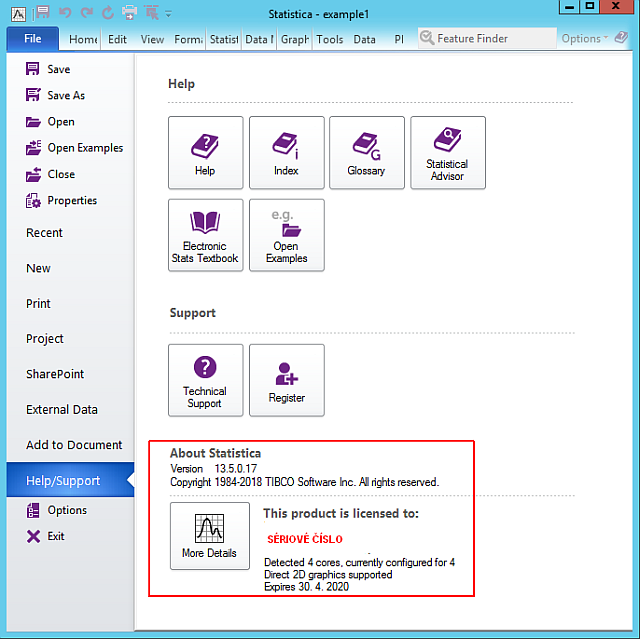
- Click File / Help / Support.
- Under the About Statistica text, to the right of the More details button, you will see the serial number you need. You can also click the More details button and copy it to the clipboard.
If you use the classic menu:
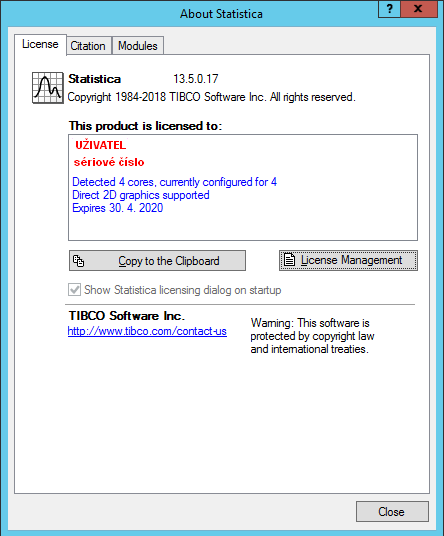
- Click Help / About Statistica.
- The serial number will then be shown on the License tab, in the section This product is licensed to:
Note: The Statistica program’s license file named STAT.lic also contains the serial number.