You may sometimes encounter this error message in Statistica; the possible causes and their suggested solutions are listed in the text below.
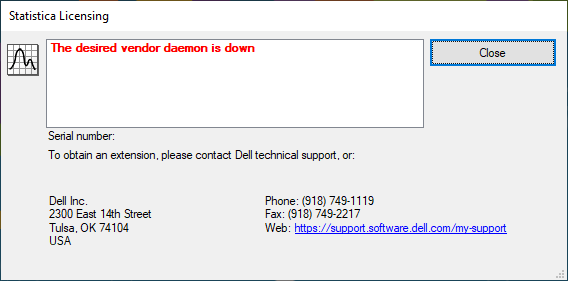
The Statistica Licence Manager service is not running.
Please make sure that the server on which Statistica Licence Manager is installed is running and that the Statistica Licence Manager service is started:
- Start / Control Panel / Administrative Tools / Service to open the Services application.
- Right-click STATISTICA License Manager service and select Restart or Start.
Server name change
- Open the lmgrd.log file, which is located in the FLEXlm folder, using Notepad or another text editor. A typical location is C:Program Files(x86)StatisticaFLEXlm.
- Open the Imgrd.log file, and if the server name has been changed, you should find the following at the end of the file:
14:40:59 (lmgrd) ———————————————–
14:40:59 (lmgrd)
14:40:59 (lmgrd)
14:40:59 (lmgrd) pid 5048
14:40:59 (lmgrd) „SERVER112“: Not a valid server hostname, exiting.
14:40:59 (lmgrd) Valid license server system hosts are: „SERVER281“
14:40:59 (lmgrd) Using license file „C:Program Files (x86)StatSoftFLEXlmstat.lic“
-
- If only the server name has been changed, you can modify the STAT.lic file and edit the server name. Open the STAT.lic file using Notepad or another text editor, change the server name to the current one, and save it, preferably to the Windows Desktop. Copy and paste the edited STAT.lic license file into the FLEXlm folder (a typical location is C:Program Files (x86)StatSoftFLEXlm).
- In the Services manager, restart the Windows service STATISTICA License Manager service.
Server hardware change or migration to another server
-
- Open the lmgrd.log file, which is located in the FLEXlm folder, using Notepad or another text editor. A typical location is C:Program Files(x86)StatisticaFLEXlm.
- At the end of the file you should find Invalid hostid on SERVER line.
- Send the STAT.lic file with the changed HostID (MAC address or UUID) as an email attachment to support@datafriends.cz. We will send the file to our partners and send you back the current, updated STAT.lic file.