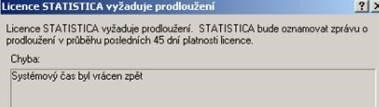
This message may appear after starting Statistica if the Windows system clock has been (or still is) shifted relative to the real time (by the user or by some program). This is a security feature of the software.
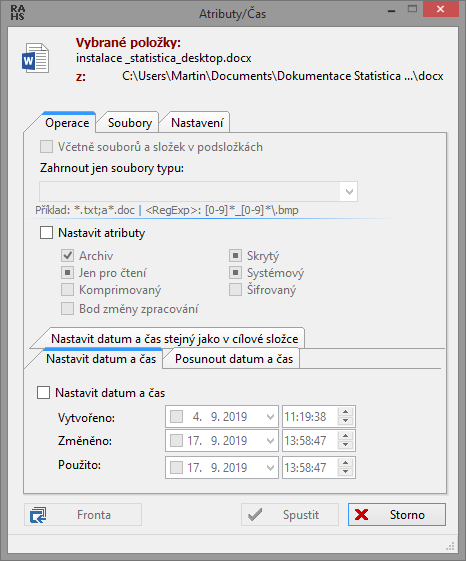
To fix the system time problem, you need to check the current system time in Windows and check whether any of the system files (not all system files) has a date shifted into the future. For these files, you need to set the creation date to the current one (by saving them again, for example in Notepad, or, in the case of directories, by changing the attributes in one of the file managers; we recommend the freely available Free Commander. It is possible that some attributes can only be changed in Safe Mode.
Problem-solving procedure
First of all, display all hidden files in the system, i.e. enable their display:
Showing hidden files and folders: http://bit.ly/tipy_pro_pc
Then check the individual files according to the procedure below. It is important to search the files in the listed folders, not the files in their subfolders, but it is also important to check the date and time of the directories themselves in the listed directories. Another option is then to reinstall the operating system.
To fix the system time problem, you need to:
Check the system time in Windows.
Check the creation/modification date of the folders and files located in these locations (only in the root, not in a subdirectory or lower levels):
c:*
c:%SystemRoot%* (the Windows system directory, e.g. c:windows, c:winnt)
and, if they exist, also in:
c:var*
c:tmp*
This date must not be set into the future (e.g. 01. 01. 2030), i.e. the creation/modification date must be today's date at the latest.
Before we start searching for these files/folders, we need to enable the display of hidden and system files. For searching files and subsequently editing attributes, we recommend the excellent and freely distributable program Free Commander.
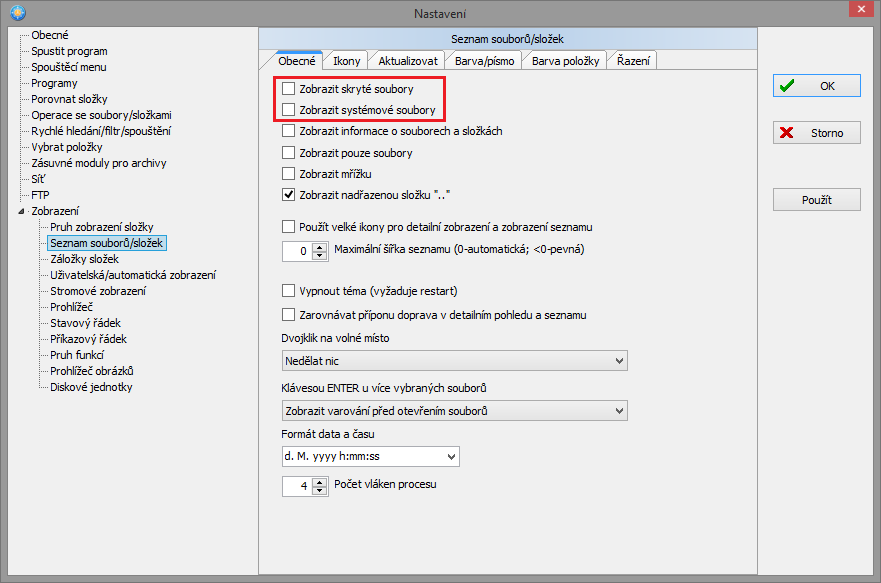 Free Commander: setting the display of hidden or system files
Once we find a file/folder with an incorrect date, we need to change this date (the option in Free Commander: Menu File / Attributes/Date and time.)